Adobe Apps Management Removed – Permissions Message
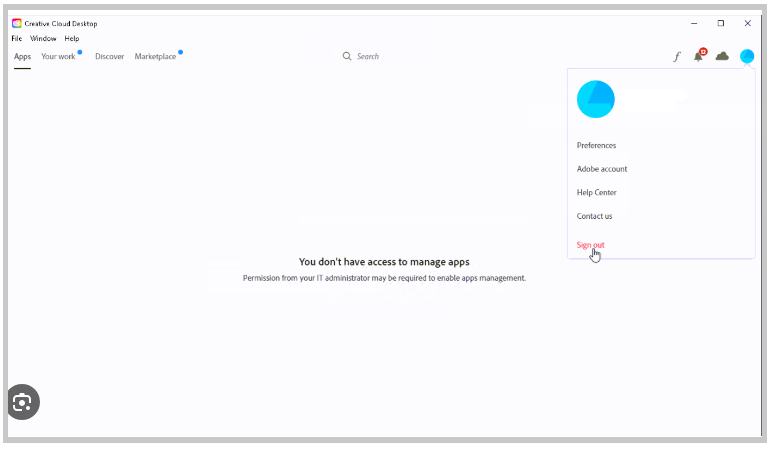
Use this guide if Adobe Creative Cloud displays:
“You don’t have access to manage apps.”
and the Apps panel is blank.
Who This Applies To
- University-owned Windows and Mac computers
- Adobe Creative Cloud users on managed devices
- Departmental IT support managing Adobe packages
Why This Happens
This message usually appears when a managed Adobe package has been installed on the computer.
Managed Adobe packages: - remove app installation/update permissions from end users - shift Adobe app management to departmental IT support
This is expected behavior on many university-managed computers.
End Users
What To Do
If you see this message:
“You don’t have access to manage apps.”
Use your university software management application instead:
- Windows: Software Center
- Mac: Managed Software Center
Software Center Instructions
Still Missing Adobe Apps?
If: - Adobe apps are missing - updates are unavailable - or installations fail
contact your department IT support team.
!!! note Your department IT administrator controls software permissions on managed university computers.
IT Support
Managed vs Self-Service Adobe Packages
A single managed Adobe package can change permissions behavior for all Adobe Creative Cloud applications on the computer.
The most recently installed Adobe package determines whether apps behave as:
- Managed
- OR self-service
Important Behavior
Managed Adobe packages:
- disable automatic Adobe updates
- require IT-managed updates using:
- SCCM
- Munki
- RUM
- other deployment systems
Recommendation
!!! tip Avoid mixing managed and self-service Adobe packages on the same computer.
If possible: - choose one deployment model - remain consistent
Self-Service Packages
Self-service Adobe packages:
- allow users to install/update Adobe apps directly
- reduce IT overhead
- do NOT remove normal OS admin protections
Self-service packages are only available for:
- Named User licensing
They are NOT available for:
- Shared Device Licensing (SDL)
Optional Workaround
Restore App Management Permissions
If appropriate for your environment, Adobe app management permissions can sometimes be restored by editing the:
- OOBE / ServiceConfig file
See: - https://answers.uillinois.edu/107858
Important Notes
- Administrative permissions may be required
- OOBE folders are often hidden by default
- This workaround is not appropriate for all managed university devices