Nigel AI for LabVIEW
Nigel AI is available to eligible University of Illinois LabVIEW users with the current Enterprise license.
Requirements
Before using Nigel, make sure you have:
-
LabVIEW Professional (Pro), version 2025 Q3 or later
- Nigel is not available with the Community or Full editions of LabVIEW.
-
An NI user account associated with your University email address.
-
Access to your University of Illinois LabVIEW Enterprise license.
-
A method for completing two-factor authentication (2FA) during NI account setup.
Get Started
-
Open LabVIEW Professional 2025 Q3 or later.
-
Open Nigel from within the LabVIEW application.
-
When prompted, sign in to your NI account or create an account using your University email address.
-
Follow the NI prompts to complete account setup and two-factor authentication (2FA).
-
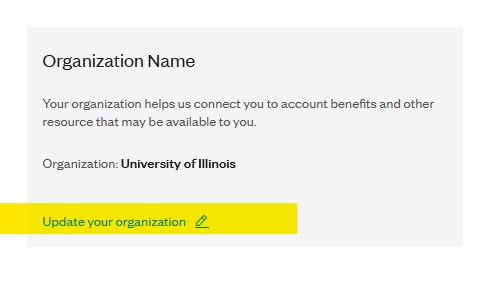
Make sure your NI account is associated with the University's LabVIEW Enterprise organization so Nigel can verify your license. An option to connect your organization will be a part of setting up a new account. For existing accounts go to https://identity.ni.com/myni/profile and select "Update your organization"
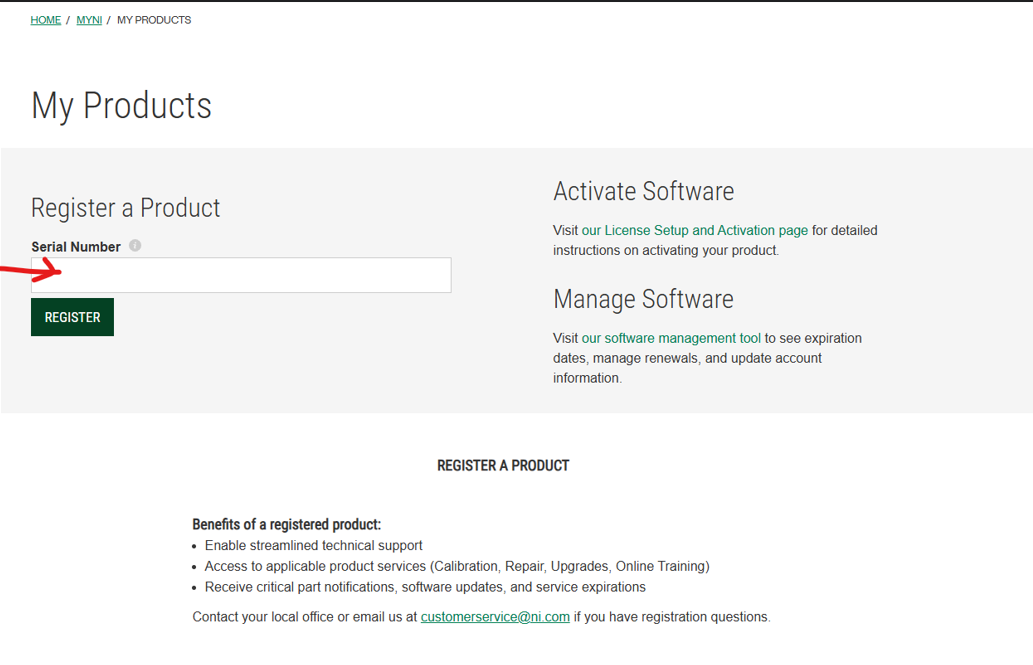
 6. For new and existing accounts go to https://www.ni.com/myni/products/ and enter the serial number for LabVIEW that is provided to you in your WebStore Order Details.
-
Wait 24 hours for LabVIEW services to register your product.
-
After your account and license are successfully registered, return to Nigel in LabVIEW.
-
Start a conversation with Nigel.